Google Sheets Connector
The Fonrex Sheets template fills a spreadsheet with fundamentals, DCF valuations and technical indicators read from your own Fonrex instance. No data goes through a Fonrex-operated service, and no paid plan is involved.
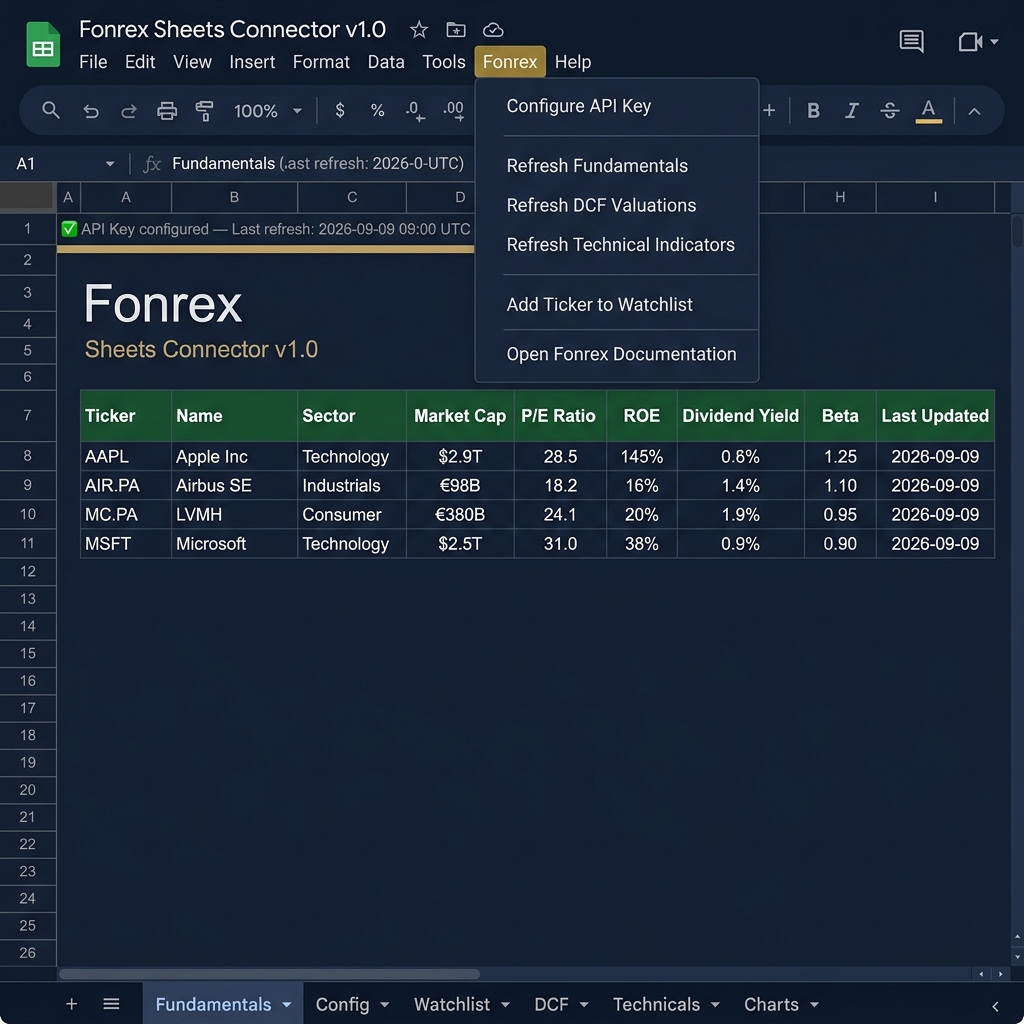
This template displays raw financial data for informational purposes only. It does not constitute investment advice. All displayed values (including DCF valuations) are analytical outputs. Always do your own research before making any investment decisions.
How it works
Google runs the script of the spreadsheet on its own servers, which cannot reach localhost. You expose your instance through a tunnel that gives it a public HTTPS URL, and the spreadsheet calls that URL with a key you give it.
Prerequisites
- A running Fonrex instance (Installation)
- A tunnel giving it an HTTPS URL (zrok, Cloudflare Tunnel, Tailscale Funnel, ngrok…)
- A Google account
Step 1 — Create a read-only key for the spreadsheet
The key will be stored in your Google account, outside the machine running Fonrex: give the spreadsheet a key that can read data but cannot clear the cache, clean the database or trigger ingestion.
echo "frx_live_$(openssl rand -hex 24)"
In the .env of your instance:
FONREX_READ_ONLY_API_KEYS=frx_live_<the generated value>
Then restart the API: docker compose up -d.
Step 2 — Expose your instance through a tunnel
Example with zrok, once your environment is enabled (zrok2 enable <token>):
# temporary URL, valid until you stop the command
zrok2 share public localhost:5000

# or a stable URL: reserve a name once, then share with it
zrok2 create name -n public myfonrex
zrok2 share public localhost:5000 -n public:myfonrex
# → https://myfonrex.share.zrok.io
With zrok 1.x the command is zrok instead of zrok2. Prefer a stable URL: with a temporary one, you reconfigure the spreadsheet each time the tunnel restarts. Check the URL from another network:
curl https://myfonrex.share.zrok.io/health
While the tunnel runs, your instance is reachable from the Internet. Only /health, the API documentation, the OpenBB discovery files and static files answer without a key. Keep FONREX_AUTH_REQUIRED enabled, never share a full-access key, and stop the tunnel when you do not need the spreadsheet.
Step 3 — Copy the template
👉 Open the Fonrex Sheets template
You get a personal copy in your Google Drive; the original is never modified.
Step 4 — Connect the spreadsheet
- In your copy, open the Fonrex menu (next to "Help").
- Configure Instance URL → paste the HTTPS URL of your tunnel.
- Configure API Key → paste the read-only key of step 1.
The URL and the key are stored in the Apps Script user properties of your Google account — never in a cell, and not shared when you share the document.
Then add tickers in column A of the Watchlist sheet (from row 2: AAPL, AIR.PA, MC.PA…), or with Fonrex > Add Ticker to Watchlist, and refresh:
- Fonrex > Refresh Fundamentals → Fundamentals sheet
- Fonrex > Refresh DCF Valuations → DCF sheet
- Fonrex > Refresh Technical Indicators → Technicals sheet
Template sheets
| Sheet | Content |
|---|---|
| Config | Connection status, last refresh date, legal warning |
| Watchlist | Tracked tickers (column A, from row 2) |
| Fundamentals | P/E, ROE, ROA, market cap, dividend yield, beta, 52-week high/low… |
| DCF | Consensus value, current price, consensus upside, WACC, FCF value |
| Technicals | RSI 14, MACD, SMA 50/200, EMA 20, Bollinger Bands, ATR 14 |
| Charts | Native charts based on the imported data |
Custom formulas
| Formula | Description |
|---|---|
=FONREX_PE("AIR.PA") | P/E ratio |
=FONREX_DIVIDEND_YIELD("AIR.PA") | Dividend yield (ratio) |
=FONREX_INTRINSIC_VALUE("AIR.PA") | DCF consensus value |
=FONREX_RSI("AAPL") | 14-period RSI |
Google caches custom formulas for 30 minutes; use the Refresh menu items for fresh data.
What the script calls
Only GET requests, with Authorization: Bearer <key>, to your instance: /fundamental/deep, /dcf/{ticker} and /technical/{ticker}/multi for the menu refreshes, and /fundamental for two of the formulas. The DCF needs the deep fundamentals of the ticker: refresh the Fundamentals sheet first.
Limitations
| Limitation | Detail |
|---|---|
| Manual refresh | No real-time updates — Apps Script has no WebSocket |
| Formula cache | 30 minutes, imposed by Google |
| Instance and tunnel must run | A refresh fails when either is stopped |
| One call per ticker and route | A refresh makes your instance query its providers for each ticker |
Troubleshooting
| Error | Probable cause | Solution |
|---|---|---|
Configure your instance URL first | URL not configured | Fonrex > Configure Instance URL |
Configure API key first | Key not configured | Fonrex > Configure API Key |
API key refused by your instance | Key not in .env, or API not restarted | Check FONREX_READ_ONLY_API_KEYS, then docker compose up -d |
Instance unreachable | Tunnel stopped or URL changed | Restart the tunnel, update the URL |
The tunnel answered instead of Fonrex | The tunnel runs but the instance does not | docker compose ps, then docker compose up -d |
Instance error or tunnel down (status 5xx) | Error in the instance, or tunnel without backend | docker compose logs fonrex-api |
Ticker not found | Symbol unknown to the API | Check the format (AIR.PA, not AIR) |
| "Fonrex" menu missing | Script not authorised | Reload the page, accept the permissions |
Security
- The script only calls the URL you configure, over HTTPS, with
GETrequests. - The manifest (
appsscript.json) requests access to the current spreadsheet and to external requests; it has no fixed list of domains, because the URL of your tunnel is yours. - With a read-only key, a leaked key cannot clear the cache, clean the database, trigger ingestion or change subscriptions.